Connect to Oracle
Start from Model > Import tables... and choose an Oracle source.
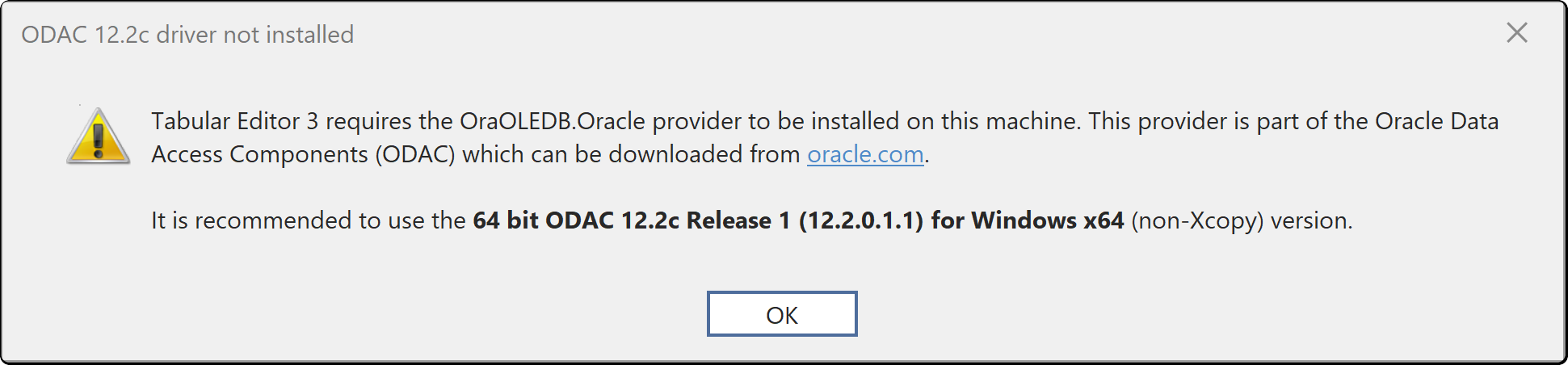
The Oracle connector requires the Oracle OLE DB provider to be installed on your machine. You get this warning if it is not:
Authenticators
Oracle connections use a database user name and password. There is no integrated or directory-based mode in the connection dialog.
| Field | What it is |
|---|---|
| Server | The TNS name, Easy Connect string or full connect descriptor |
| User name and Password | An Oracle database account |
| Additional options | Extra connection string settings, passed through unchanged |
Identifiers
Oracle object names are always quoted with double quotes, and Oracle treats an unquoted name as upper case. A table created as sales is therefore "SALES" unless it was created quoted. If the wizard does not list a table you expected, check the case of its name in Oracle before assuming a permissions problem.
Where the credentials are stored
Credentials you enter here are saved per user and per model in the user options file (.tmuo) beside the model, encrypted so that only your Windows account can read them. They are not part of the model metadata, so they are not committed to source control and a colleague opening the same model supplies their own.
The generated M expression names the server and the object only. It never contains a password, a token or a key.